
If you've ever wrapped up a long day at the computer with dry, aching eyes and a low-grade headache that just won't quit, you're in good company. The good news is that learning how to protect eyes from computer screens isn't complicated. It usually comes down to a few smart tweaks to your workspace, your screen settings, and your daily habits.
Believe it or not, even simple changes like taking regular breaks or just turning down your monitor's brightness can bring some surprisingly fast relief.
That feeling of total eye exhaustion isn't just you being dramatic—it's a very real condition called Computer Vision Syndrome (CVS), often just called digital eye strain.
When you're locked onto a screen for hours, your eyes are putting in a serious workout. Think about it: the letters on a printed page are solid and crisp, but the pixels on a screen have fuzzy edges. This forces the tiny muscles in your eyes to constantly refocus just to keep things sharp.
On top of that, we have another bad habit we don't even notice. We blink way less when we're focused on a screen—sometimes by as much as half the normal rate! Blinking is how our eyes stay lubricated, so when we don't do it enough, we get that classic dry, gritty, and irritated feeling.
This isn't a niche problem; it's practically universal. A massive 2023 meta-analysis found that Computer Vision Syndrome hits about 69% of the global population. To make matters worse, every extra hour you spend in front of a screen bumps up your risk by another 12%.
This goes beyond just feeling uncomfortable. Chronic eye strain can tank your productivity, sour your mood, and even mess with your sleep. And quality sleep is non-negotiable for eye health. It’s the only time your body gets to repair and rehydrate the delicate tissues in your eyes.
When you sleep, your eyes finally get a real break. The focusing muscles relax completely, and your cornea—the clear outer layer—gets replenished with the nutrients and moisture it needs to face another day. Without adequate sleep, you start the day with eyes that are already fatigued and less resilient to screen-induced stress.
So, what are the common red flags? Most people experience a handful of the same symptoms.
Here’s a quick rundown of what digital eye strain typically feels like. See how many of these sound familiar.
| Symptom | What It Feels Like |
|---|---|
| Dry, Gritty Eyes | A sandy or scratchy sensation, as if something is in your eye. |
| Headaches | Often a dull, aching pain around the temples or behind the eyes. |
| Blurred Vision | Difficulty focusing, or objects appearing fuzzy, especially after looking away from the screen. |
| Watery or Red Eyes | Your eyes might tear up excessively or look bloodshot from irritation. |
| Neck & Shoulder Pain | Poor posture from leaning into the screen often leads to tension in the upper body. |
| Light Sensitivity | Increased sensitivity to both screen glare and ambient room lighting. |
Recognizing these signs is the first step. The key takeaway is simple: our eyes just weren't built for staring at a glowing box all day.
To dig deeper into how screens affect your eyes, you can explore our blue light blog for more insights. In the next sections, we’ll get into the practical, actionable steps you can take to fight back against these effects and keep your vision sharp for the long haul.
Your physical environment is one of your most powerful allies in the fight against eye strain. Instead of just toughing it out, you can strategically set up your workspace to reduce discomfort from the moment you sit down. The whole idea is to create a space where your eyes can work in their most natural, relaxed state.
It all starts with where you put your screen. So many of us work with laptops flat on a desk or with monitors positioned way too low, forcing us into that dreaded hunch. This doesn't just wreck your neck and shoulders; it also puts a ton of unnecessary pressure on your eye muscles.
Getting the placement right is simpler than you might think. Sit back comfortably in your chair and stick your arm straight out—your fingertips should just about graze the screen. This distance, usually around 20 to 25 inches, is the sweet spot that helps your eyes focus with minimal effort.
Next up is height. The top edge of your monitor should be at or just a hair below your eye level. This encourages a slight downward gaze, which is a much more natural resting position for your eyes than looking straight ahead or, even worse, up.
Lighting is another huge piece of the puzzle. Working in a room that’s either too dim or blindingly bright creates a harsh contrast that just wears your eyes out. But the absolute worst offender is glare—that distracting, shiny reflection of light bouncing off your screen.
Think of your screen like a mirror. If you can clearly see a bright window or a harsh overhead light reflected in it, you're forcing your eyes to work overtime to see past it.
One of the easiest and most effective changes you can make is to position your desk so that any windows are to the side of you, not directly in front or behind. This simple move can slash screen glare and bring immediate relief.
If moving your desk isn't an option, look into an anti-glare screen filter or just make better use of your blinds. Swapping out harsh fluorescent bulbs for softer, ambient lamps can also create a much more comfortable visual environment. The goal is balance, not a spotlight.
For a lot of us, work involves more than just staring at a screen. If you're constantly looking back and forth between physical documents on your desk and your monitor, you're adding a layer of strain you might not even realize.
This constant near-to-far-and-back-again focusing is like doing rapid push-ups for your eye muscles—they get tired, fast. This is where a simple document holder can be a total game-changer. By placing your papers right next to your monitor at the same height and distance, you practically eliminate the need for your eyes to constantly readjust.
These small ergonomic tweaks really add up, leading to significant relief over a full workday. Taking a proactive approach like this doesn’t just ease strain in the moment; it can also lead to better sleep by cutting down on end-of-day fatigue and headaches. And we all know that well-rested eyes are fundamental for long-term health.
Your physical setup is just one piece of the puzzle. The settings on your monitor are a seriously powerful tool for keeping your eyes comfortable, but most of us just plug in a new screen and go with whatever the factory decided was best. Let's fix that.
Think of your display less like a static window and more like a dynamic part of your room that needs to adapt. A few simple tweaks can make a world of difference.
First up, brightness. Your screen shouldn't feel like a lamp shining in your face. It should blend in with the light in your room. A good test is to look away from your screen and then back at it. If you have to squint like you're staring into a lightbulb, it’s too bright. On the flip side, if you're leaning in to make out the words, it’s too dim.
Next, let's talk contrast. Cranking up the contrast makes text pop, creating a sharper difference between the letters and the background. This little adjustment seriously reduces the effort your eyes have to make to focus. And while you're at it, don't be afraid to bump up the font size. No one ever won a prize for reading the tiniest text on the screen.
Blue light is a hot topic for a reason. It's a type of high-energy visible (HEV) light that our digital devices love to emit, and it can be especially disruptive when you're trying to wind down. The biggest issue is its knack for messing with melatonin, the hormone that tells your body it’s time to sleep.
When you don't get good sleep, your eyes pay the price. Deep sleep is when your body gets to work repairing tissues, and that includes your eyes. It’s when your corneas rehydrate and the tiny muscles that control your focus finally get a chance to chill out. Late-night blue light exposure throws a wrench in this whole process, leaving your eyes feeling gritty, dry, and just plain tired the next day.
Luckily, our devices are getting smarter about this. Most have built-in tools to help you out:
Another option you've probably seen everywhere is blue light filtering glasses. These are made with special lenses that block or absorb a percentage of blue light, which can help reduce eye strain and, more importantly, support a healthier sleep cycle. Think of them as a final line of defense when you're burning the midnight oil or scrolling before bed.
The reality is, digital eye strain—or computer vision syndrome (CVS)—is a massive problem. It affects an estimated 60 million people worldwide. With more than half the population in the US spending six or more hours a day on screens, it's no surprise that symptoms like dry eyes, headaches, and blurry vision affect up to 90% of regular device users. You can dig into more of the data on how screens impact our vision in this detailed review.
Blue light glasses are a specific tool for a specific job. They’re most effective in the evening to help protect your melatonin production and signal to your brain that it’s time to wind down for sleep.
But they aren't a magic wand for daytime eye fatigue. For that, you still need to lean on good habits like adjusting your screen, fixing your ergonomics, and taking those all-important breaks. The best approach is to combine everything—that way, you’re building a complete defense to protect your eyes all day long.
While optimizing your workspace and screen settings is a great first step, the real secret to long-term eye comfort comes down to your daily habits. It’s the small, consistent actions that truly prevent eye strain from building up over time.
Hands down, the most powerful technique you can adopt is the 20-20-20 rule. It's a ridiculously simple exercise designed to give your eye's focusing muscles a much-needed break.
Here’s how it works: Every 20 minutes you're staring at a screen, you need to shift your gaze to an object at least 20 feet away. Lock your eyes on it for a full 20 seconds. I recommend setting a recurring timer on your phone or computer to make this a non-negotiable part of your workday. It’s the perfect way to interrupt that constant near-focus that leaves your eyes feeling so tired.
This might sound too simple, but another surprisingly effective habit is conscious blinking. When we get absorbed in our work, our blink rate can drop by more than half. Blinking is your body’s natural way of cleaning and rehydrating your eyes, so doing it less is a fast track to dryness and irritation.
Make a deliberate effort throughout the day to perform full, complete blinks. Don't just flutter your eyelids—gently but completely close them, then open again. This simple action spreads a fresh layer of tears across your cornea, keeping everything lubricated and comfortable.
One of the biggest mistakes people make is underestimating the power of small breaks. The 20-20-20 rule isn't just a suggestion; it's a foundational practice for anyone serious about protecting their eyes from screen fatigue.
Eye health professionals constantly champion practical measures like this. They also advise balancing screen time with outdoor activity, which helps reduce the risk of developing myopia and other issues. You can learn more about the latest expert recommendations for digital eye strain to understand the bigger picture.
Your overall wellness has a direct impact on your eye health. Just like the rest of your body, your eyes need the right fuel and rest to function at their best.
Staying hydrated is a fantastic start, as dehydration can quickly lead to dry, gritty-feeling eyes. But you can take it a step further by focusing on specific nutrients that support vision. Adequate rest is just as crucial as nutrition; good sleep allows your eyes to repair and absorb these nutrients effectively.
Think of it as maintaining your eyes from the inside out. Try to incorporate more foods rich in these compounds:
This infographic is a great visual guide for setting up an ergonomic desk, which perfectly complements these healthy habits.
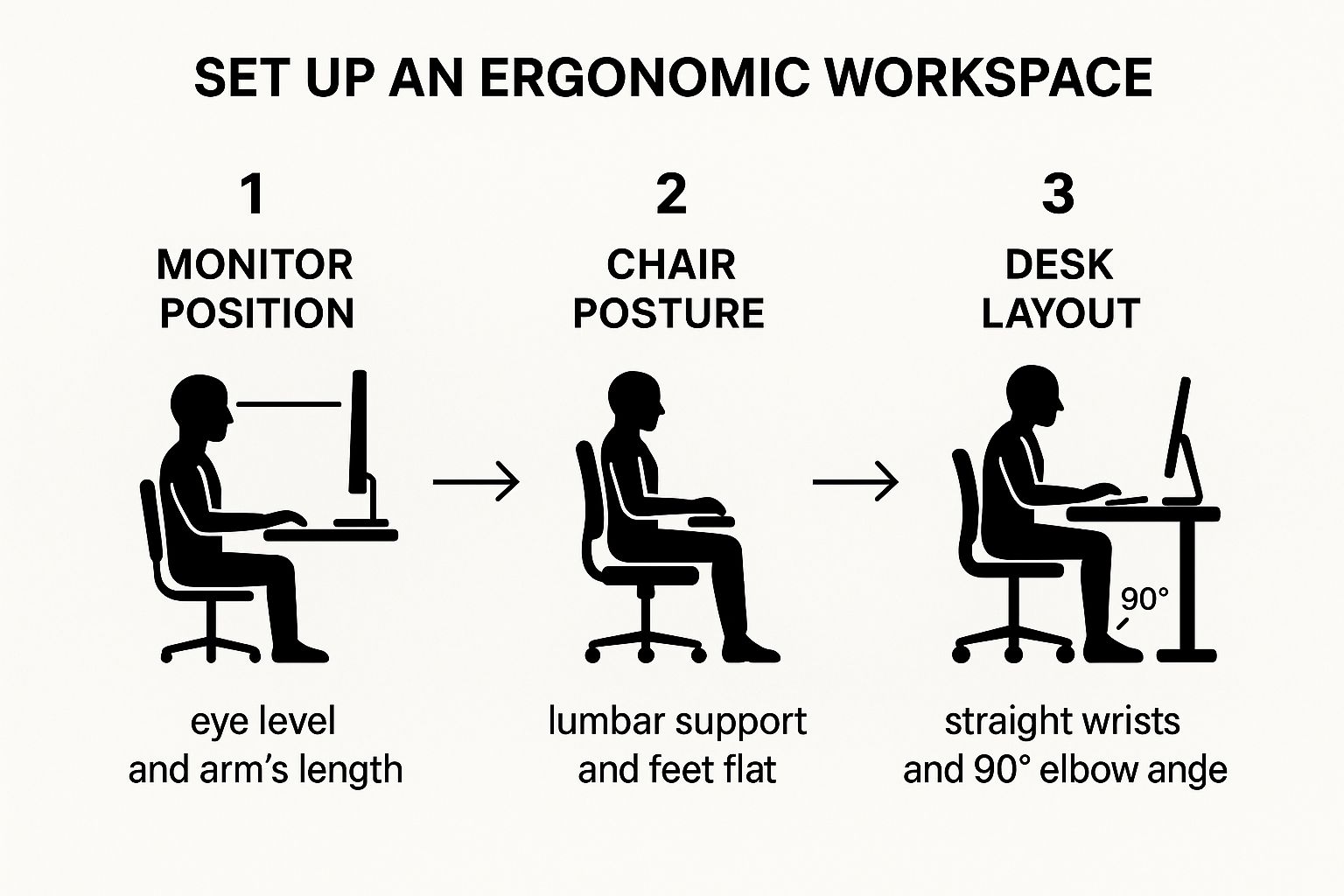
It really shows how your monitor position, posture, and desk layout all work together to minimize physical strain. When you combine these ergonomic adjustments with proactive habits like the 20-20-20 rule and conscious blinking, you create a powerful, multi-layered defense against digital eye strain.
Protecting your eyes isn’t just about what you do during the workday—it's also about what happens when you turn off the lights. Think of sleep as your body’s ultimate reset button. For your eyes, it’s a non-negotiable period of intense repair and recovery.
While you’re asleep, your body is hard at work. Your eyes finally get a chance to rehydrate, the cells on the surface of your cornea are repaired, and the tiny ciliary muscles that control your focus get to completely relax after a long day of flexing.
Without that essential downtime, you're starting the next day at a disadvantage, with eyes that are already fatigued, dry, and strained. This is exactly why that late-night scroll session can be so damaging. The blue light blasting from our phones, tablets, and computers is particularly good at suppressing melatonin, the crucial hormone that tells your body it's time to sleep.
When your melatonin production gets thrown off, it doesn't just take you longer to fall asleep; it can torpedo the overall quality of your rest. This means your eyes miss out on that critical recovery window, leaving you with that gritty, strained feeling in the morning.
Imagine trying to run a marathon after just a few hours of light, interrupted rest. That’s what you’re asking your eyes to do every time you sacrifice sleep for more screen time. You can learn more about how quality rest is impacted and whether glasses can help improve sleep right here in our detailed guide.
A good night's sleep is one of the most effective, free tools you have to combat digital eye strain. It allows the natural healing processes to take place, ensuring your eyes are refreshed and ready for the demands of the next day.
To support this vital process, you need a healthy pre-bedtime routine that prioritizes winding down over scrolling.
The single most effective way to protect your sleep is to establish a "digital sunset." This simply means putting away all screens—yes, including your phone—for at least one to two hours before you plan to go to sleep.
This buffer period gives your brain time to ramp up melatonin production naturally, without the interference of blue light.
Here are a few ways to make this happen:
By making these simple but powerful changes, you give your eyes the best possible chance to fully recover each night. This one habit alone can make a huge difference in how your eyes feel, helping you protect your vision from the daily grind.
All the tips and tricks we've covered are fantastic for managing the daily grind of digital eye strain. Think of them as your first line of defense, but they aren't a replacement for professional medical care. A huge part of protecting your eyes from your computer screen is knowing when to call in an expert.
Sometimes, that nagging discomfort is a sign that screens are just making an underlying issue worse. Those frequent headaches or that frustratingly blurry vision might not just be fatigue. It could be an uncorrected prescription that’s finally catching up with you or even an eye alignment problem that needs a professional look.
If you start experiencing any of the following, don't just wait for them to go away. It’s time to book an appointment with your eye doctor.
A comprehensive eye exam is the only way to get a truly complete and accurate picture of what's going on with your vision and overall eye health. An optometrist can spot potential issues long before you even notice major symptoms.
Ultimately, think of these check-ups as proactive maintenance for your eyes. They ensure your prescription is spot-on and help rule out more serious conditions. When you pair regular doctor visits with healthy habits—like prioritizing restorative sleep—you're setting yourself up for clear, comfortable vision for years to come.
Even after you've nailed down the basics, a few specific questions always seem to pop up. Let's tackle some of the most common ones I hear to give you some quick clarity.
They absolutely can, especially if you use screens in the evening. By filtering out the specific wavelengths of blue light that mess with your body's internal clock, they can ease that tired, strained feeling and help regulate your sleep cycle. Getting good sleep is crucial for letting your eyes recover overnight.
But they aren't a magic bullet. They work best as one tool in your toolbox, combined with regular breaks and smart screen settings.
The biggest mistake is thinking one tool can solve everything. True eye protection comes from a combination of good habits, proper ergonomics, and smart tools used at the right times.
Nope, this is a classic myth. That stark contrast between a super bright screen and a pitch-black room actually makes your eyes work way harder to adjust, which ramps up the strain big time. A poorly lit environment can also disrupt your circadian rhythm, impacting your sleep quality later on.
The ideal setup is soft, ambient lighting in the room. You want enough light to see comfortably without it causing a distracting glare on your screen.
For more quick tips and deeper dives into eye health, check out the valuable articles in our online resources.
Ready to give your eyes the nightly recovery they deserve? The amber lenses in Element Lux glasses block over 99% of disruptive blue light, helping you wind down naturally for better, more restorative sleep. Protect your eyes and reclaim your rest by exploring our collection at https://element-lux.com/shop-now.
